本节将介绍一个简单的PHP、Ajax和MySQL三者交互的例子,实现一个用户信息查询系统,主要是通过Ajax请求服务器查询MySQL数据库数据,然后把查询结果反馈回浏览器,最后把反馈数据填充到页面进行展示。
思路:1. 在user.html里准备一个用户ID输入框、一个查询按钮(触发回调函数sendAjax)和一个显示标签(div.result),通过sendAjax()函数向test.php服务器发送请求。2. sendAjax()函数主要内容是:创建XMLHttpRequest对象,配置为表单提交,通过send()方法提交数据,在请求成功时获取数据,填充div.result的标签内容。3. test.php处理请求,连接MySQL数据库,查询dotcpp_users表中的用户信息,返回格式化数据。
1.先准备一张表,这里我是在dotcpp数据库下创建了一张dotcpp_users表:
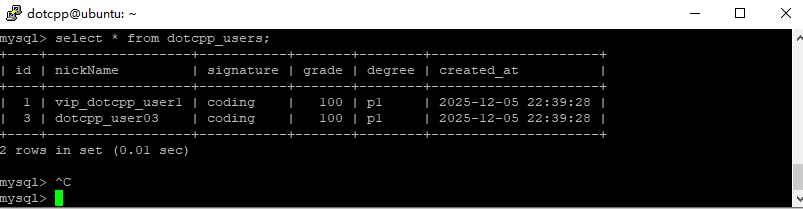
没有表格也没有关系,这里我准备了同例的表格和内容:
1.1创建dotcpp_users表:
CREATE TABLE dotcpp_users (
    id INT(11) NOT NULL AUTO_INCREMENT,
    nickName VARCHAR(50) NOT NULL,
    signature VARCHAR(255),
    grade INT(11) DEFAULT 1,
    degree VARCHAR(50),
    created_at TIMESTAMP DEFAULT CURRENT_TIMESTAMP,
    PRIMARY KEY (id)
) ENGINE=InnoDB DEFAULT CHARSET=utf8mb4;
1.2 insert into填充dotcpp_users表内容:
INSERT INTO dotcpp_users (nickName, signature, grade, degree, created_at) VALUES
('vip_dotcpp_user1', 'coding', 100, 'p1', '2025-12-05 22:39:28'),
('dotcpp_user03', 'coding', 100, 'p1', '2025-12-05 22:39:28');
2. test.html:
<!DOCTYPE html>
<html>
<head>
    <meta charset="UTF-8">
    <title>PHP Ajax MySQL 用户查询示例</title>
</head>
<body>
    <h2>Dotcpp用户信息查询系统</h2>

    <p>输入用户ID(1 或 2):</p>
    <input type="text" id="user_id" placeholder="输入用户ID" value="1">
    <button onclick="sendAjax()">查询用户</button>

    <div id="result" style="width:700px">
        这里将显示查询到的用户信息
    </div>

    <script>
    function sendAjax() {
        // 1. 获取输入框的值
        let user_id = document.getElementById("user_id").value;

        // 2. 验证输入
        if (!user_id || isNaN(user_id) || user_id <= 0) {
            document.getElementById("result").innerHTML = "<span style='color: red;'>请输入有效的用户ID!</span>";
            return;
        }

        // 3. 创建XMLHttpRequest对象
        let xhr = new XMLHttpRequest();

        // 4. 配置请求
        xhr.open("POST", "test.php", true);
        xhr.setRequestHeader("Content-Type", "application/x-www-form-urlencoded");//指定发送方式是表单提交

        // 5. 定义响应处理函数
        xhr.onreadystatechange = function() {
            /*readystate==4&&status==200表示一个http请求已经成功完成!*/
            if (xhr.readyState == 4 && xhr.status == 200) {
                // 更新页面显示结果
                document.getElementById("result").innerHTML = xhr.responseText;//进行div.result的内容更新
            }
        };

        // 6. 发送请求(发送数据)
        xhr.send("user_id=" + encodeURIComponent(user_id));
    }
    </script>
</body>
</html>
3. test.php
<?php
// 设置响应头,防止中文乱码
header('Content-Type: text/html; charset=utf-8');
// 获取POST数据
$user_id = isset($_POST['user_id']) ? intval($_POST['user_id']) : 0;
// 简单的验证
if ($user_id <= 0) {
    echo "<div style='color: red; padding: 10px; border: 1px solid #f00;'>请输入有效的用户ID!</div>";
    exit;
}
// 数据库连接配置(请根据实际情况修改)
$host = 'localhost';      // 数据库主机
$dbname = 'dotcpp';       // 数据库名
$username = 'dotcpp';       // 数据库用户名
$password = 'dotcpp';           // 数据库密码
try {
    // 1. 创建数据库连接
    $conn = new PDO("mysql:host=$host;dbname=$dbname;charset=utf8mb4", $username, $password);

    // 2. 设置PDO错误模式为异常
    $conn->setAttribute(PDO::ATTR_ERRMODE, PDO::ERRMODE_EXCEPTION);

    // 3. 准备SQL查询语句
    $sql = "SELECT id, nickName, signature, grade, degree, created_at FROM dotcpp_users WHERE id = :user_id";
    $stmt = $conn->prepare($sql);

    // 4. 绑定参数
    $stmt->bindParam(':user_id', $user_id, PDO::PARAM_INT);

    // 5. 执行查询
    $stmt->execute();

    // 6. 获取查询结果
    $user = $stmt->fetch(PDO::FETCH_ASSOC);

    // 7. 处理查询结果
    if ($user) {
        // 格式化输出用户信息
        echo "<h3>用户信息查询结果</h3>";
        echo "<p><strong>用户ID:</strong>" . htmlspecialchars($user['id']) . "</p>";
        echo "<p><strong>昵称:</strong>" . htmlspecialchars($user['nickName']) . "</p>";
        echo "<p><strong>个性签名:</strong>" . htmlspecialchars($user['signature']) . "</p>";
        echo "<p><strong>积分:</strong>" . htmlspecialchars($user['grade']) . "分</p>";
        echo "<p><strong>等级:</strong>" . htmlspecialchars($user['degree']) . "</p>";
        echo "<p><strong>注册时间:</strong>" . htmlspecialchars($user['created_at']) . "</p>";
        echo "</div>";
    } else {
        echo "<div style='color: #856404; background-color: #fff3cd; padding: 10px; border: 1px solid #ffeaa7; margin-top: 10px;'>
                未找到ID为 <strong>" . htmlspecialchars($user_id) . "</strong> 的用户!
              </div>";
    }

} catch(PDOException $e) {
    // 数据库连接或查询错误
    echo "<div style='color: #721c24; background-color: #f8d7da; padding: 10px; border: 1px solid #f5c6cb; margin-top: 10px;'>
            <strong>数据库错误:</strong>" . htmlspecialchars($e->getMessage()) . "
          </div>";
}
?>
4. 效果演示
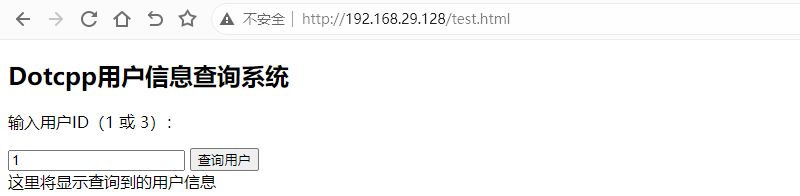
4.1 进入test.html页面(这里我表里只有id=1和id=3的数据):
4.2 查询用户ID为1:
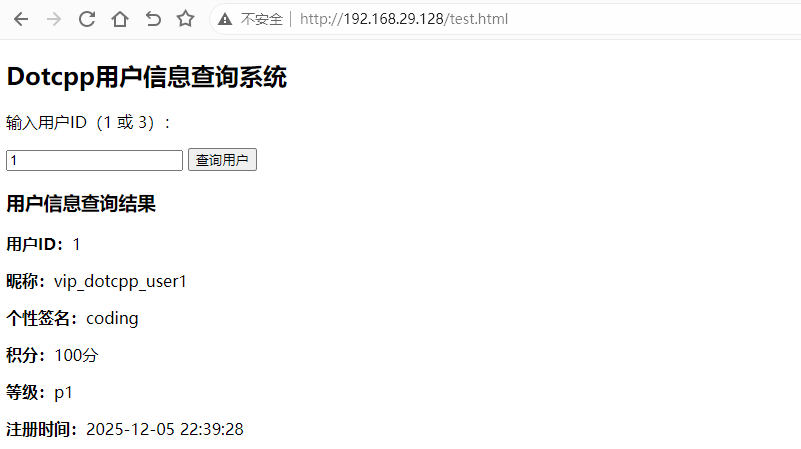
当输入用户ID为1并点击"查询用户"按钮后,页面局部更新显示:
总结:本节通过一个完整的Dotcpp用户信息查询示例,展示了PHP、Ajax和MySQL三者的简单交互操作。这个例子演示了如何通过Ajax异步请求从MySQL数据库查询数据,并在不刷新整个页面的情况下更新页面内容。
C语言网提供由在职研发工程师或ACM蓝桥杯竞赛优秀选手录制的视频教程,并配有习题和答疑,点击了解:
一点编程也不会写的:零基础C语言学练课程
解决困扰你多年的C语言疑难杂症特性的C语言进阶课程
从零到写出一个爬虫的Python编程课程
只会语法写不出代码?手把手带你写100个编程真题的编程百练课程
信息学奥赛或C++选手的 必学C++课程
蓝桥杯ACM、信息学奥赛的必学课程:算法竞赛课入门课程
手把手讲解近五年真题的蓝桥杯辅导课程