本节将用QT6为带大家演示如何实现界面版计算器,带大家一步步做一个计算器项目,只要大家有基本的C++语法基础,会基本的QT操作即可尝试,下面我们开始
第一步,首先还是创建一个项目,这里选择QT Widgets Application
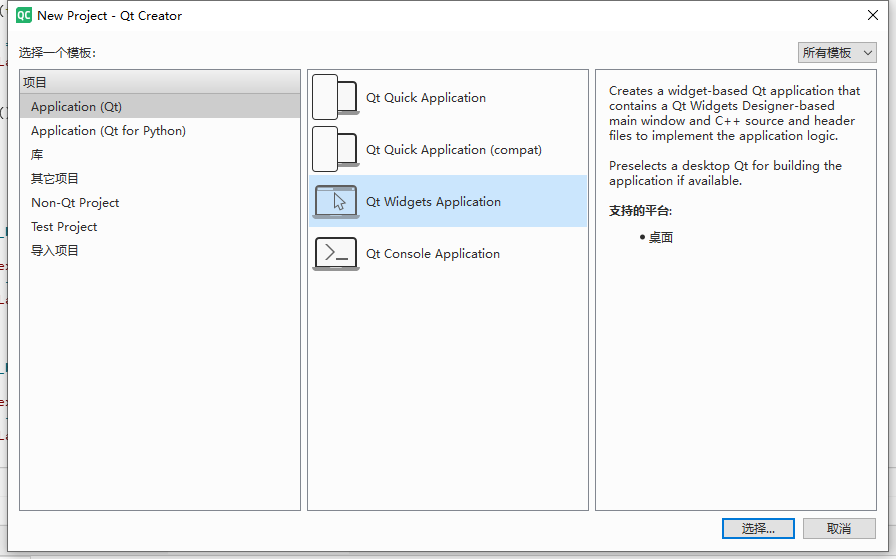
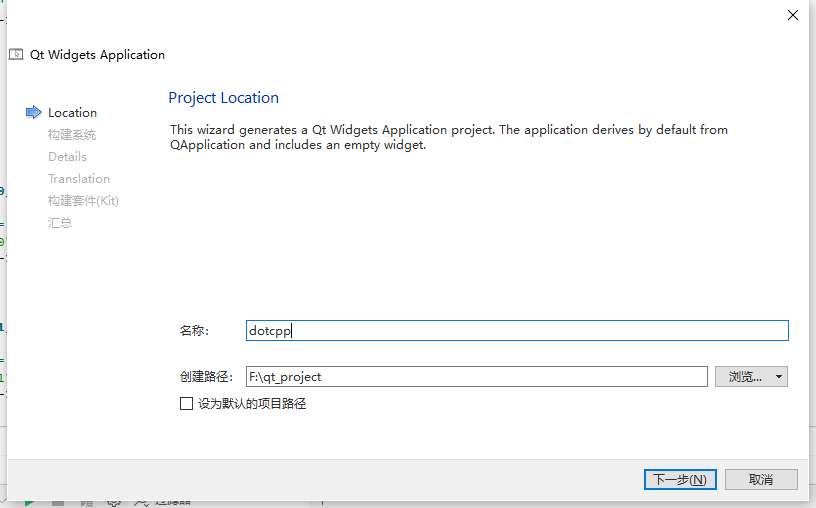
第二步,填写项目名、保存路径
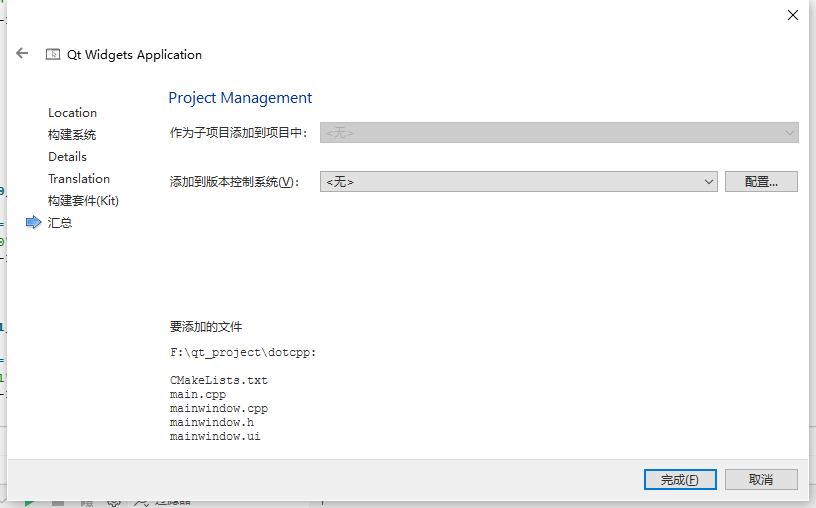
第三步,我们一路下一步即可,最后汇总页面确认
第四步,项目创建完毕工程文件如下,如果不是这样的话,点击组左侧的编辑按钮即可
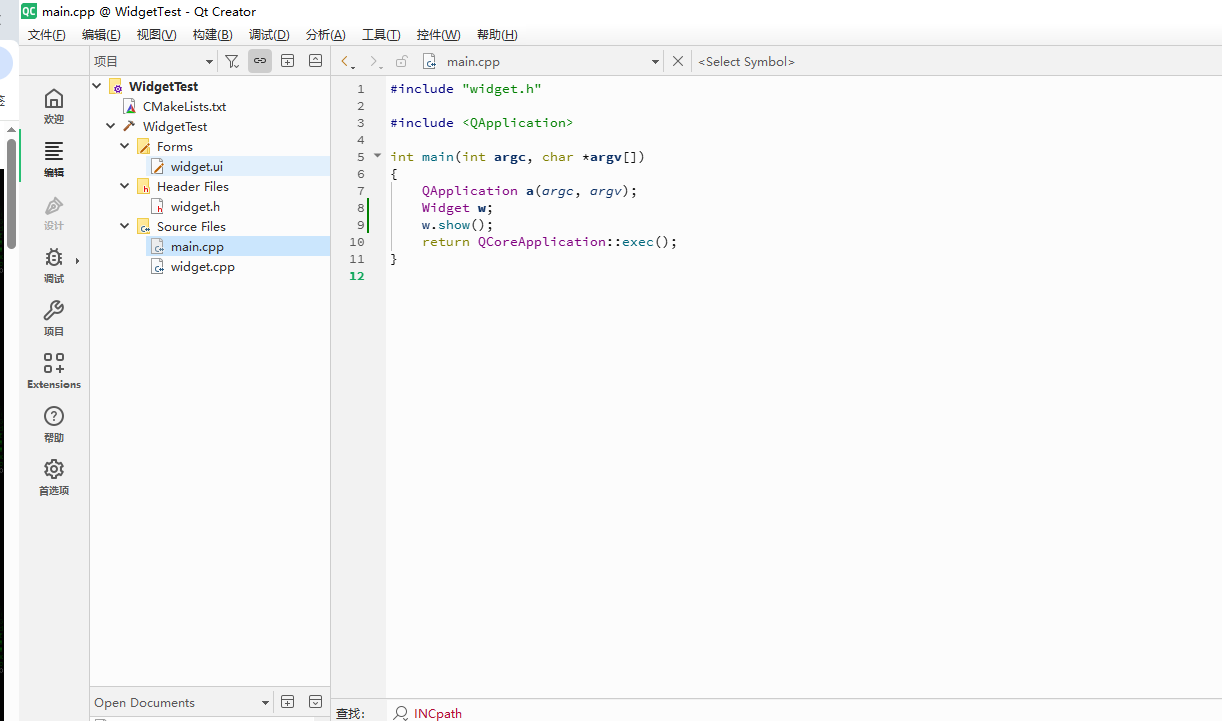
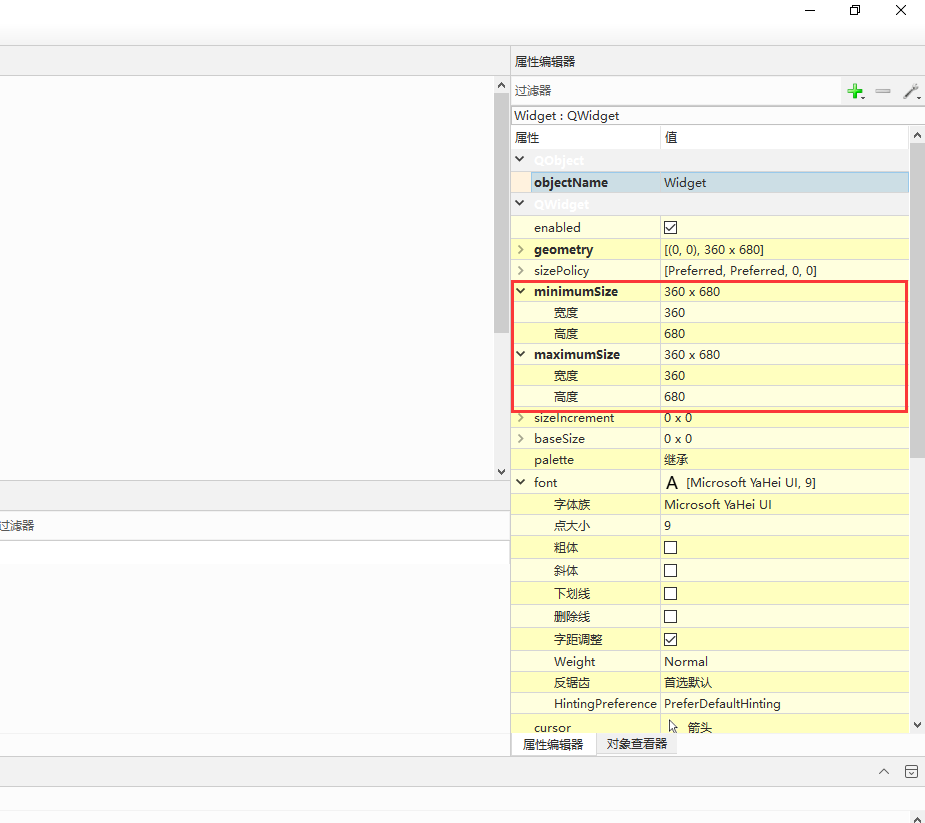
第五步,双击工程目录里的Forms文件夹下的“Widget.ui”,然后鼠标单击选中界面,在右侧的 属性编辑器中,修改mininumSize和maxinumSize的值,都设置为360x680大小,这也就是最终计算器打开后界面的大小
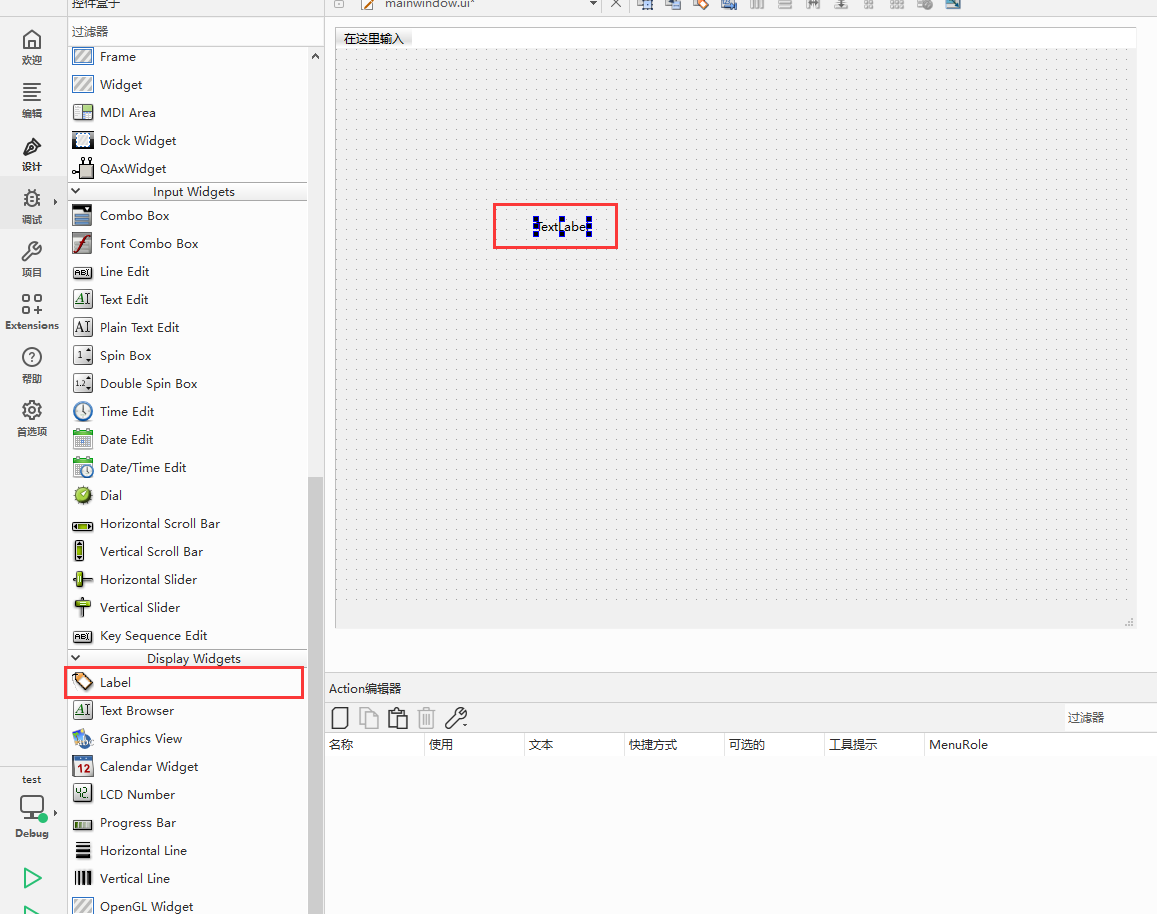
第六步,为窗体添加按钮,先添加计算器的显示屏,这里我们先添加Label控件,位于Display Widgets里,然后鼠标拖到右侧位置,如下图:
第七步,修改Label的属性,在属性编辑器中,大家按照下图中红框中的修改即可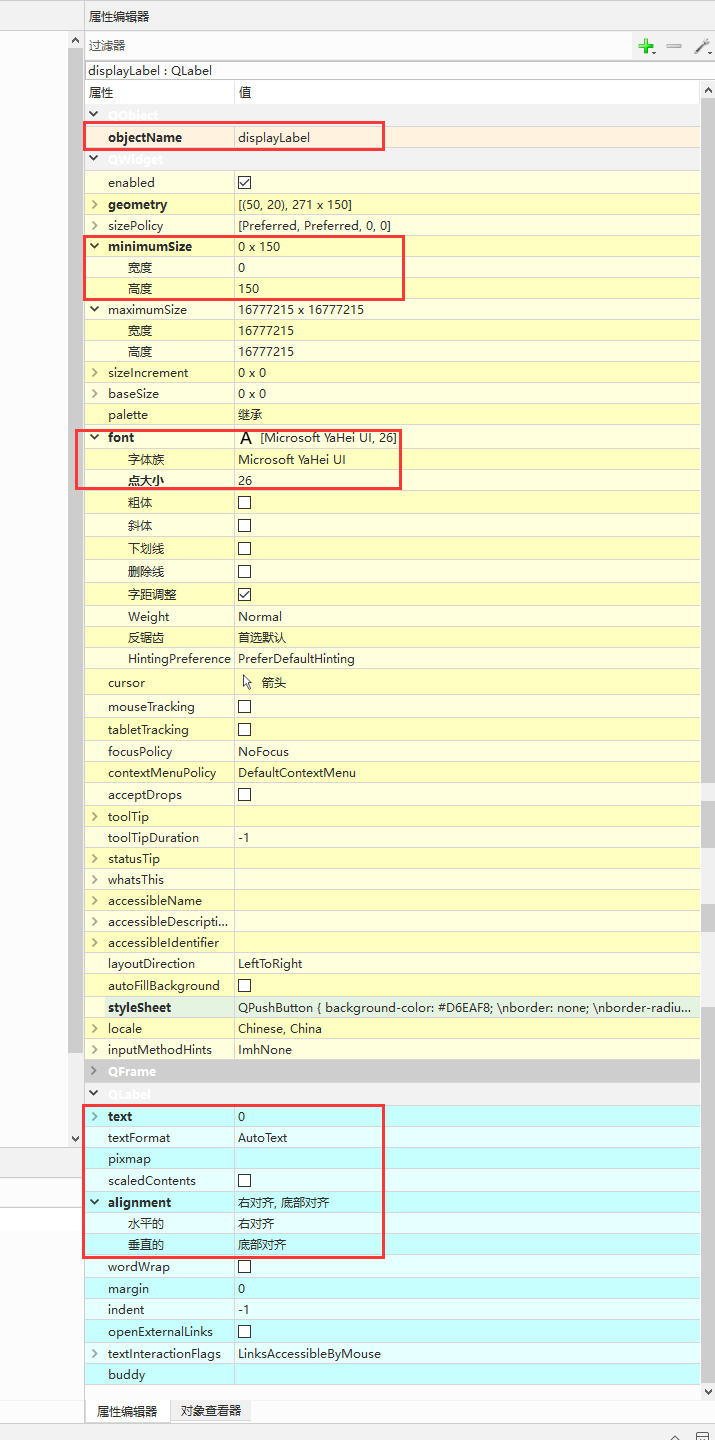
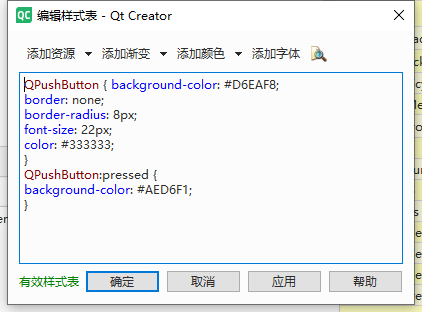
第八步,改变Label控件的样式,右键Label控件,然后选择“改变样式表”,在弹出框里输入如下代码:
QPushButton { background-color: #D6EAF8;
border: none;
border-radius: 8px;
font-size: 22px;
color: #333333;
}
QPushButton:pressed {
background-color: #AED6F1;
}
点击确定即可
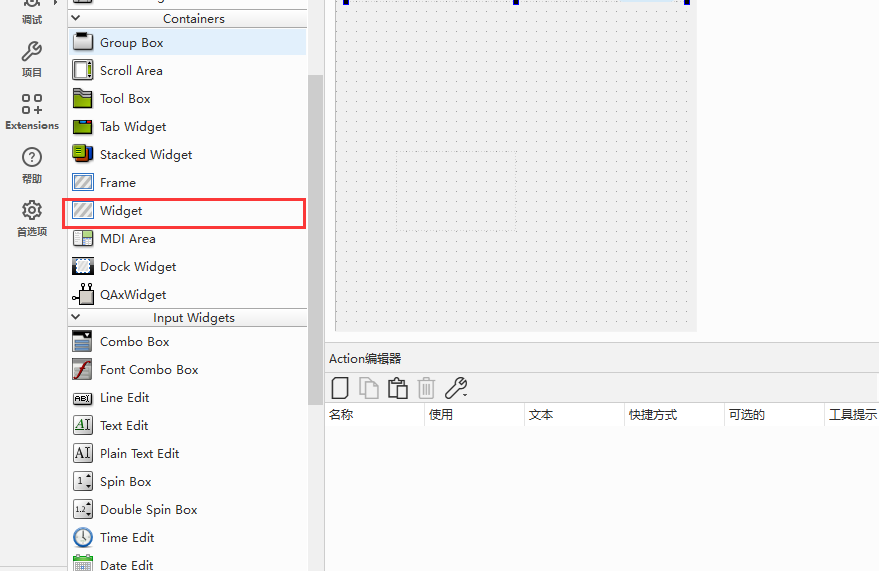
第九步,添加控件"Widget",放在显示屏的正下方,控件位于Containers里
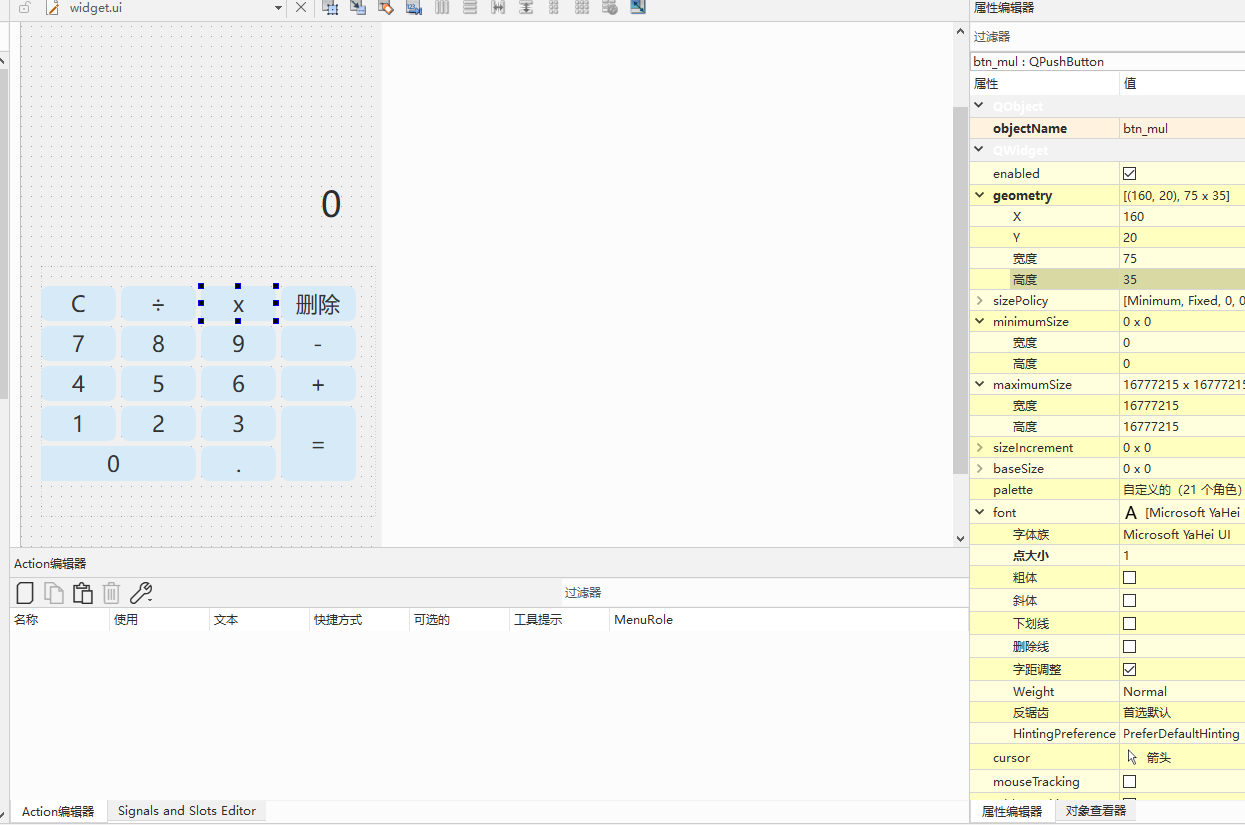
第十步,开始添加0~9、加减乘除等其他按钮,这些可以使用“Push Button”控件,该控件位于Button分类里,大家需要托18个控件,因为包括数字0~9、加减乘除、等于、删除、小数点、清空一共18个操作。每一个按钮都要设置objectName和text两个值,每个按钮的objectName对应的text值分别如下:
| btn_clear对应C | btn_div对应÷ | btn_mul对应x | btn_del对应清空 |
| btn_7对应数字7 | btn_8对应数字8 | btn_9对应数字7 | btn_sub对应 - |
| btn_4对应数字4 | btn_5对应数字5 | btn_6对应数字6 | btn_add对应 + |
| btn_1对应数字1 | btn_2对应数字2 | btn_3对应数字3 | btn_eq对应 = |
| btn_0对应数字0 | btn_dot对应 . | ||
这里 已经按照计算器的界面为大家排版,设定完后,为每一个按钮右键“改变样式表”,输入如下代码:
QPushButton {
background-color: #D6EAF8;
border: none;
border-radius: 8px;
font-size: 22px;
color: #333333;
}

QPushButton:pressed {
background-color: #AED6F1;
}
第十一步,之后大家可以调整按钮大小与对齐,是这个样子:
第十二步,这只是设置好样式,还并没有计算的功能!下面我们开始添加头文件和源文件的代码,cpp文件如下:
#include "widget.h"
#include "./ui_widget.h"
#include <QJSEngine>
#include <QRegularExpression>

Widget::Widget(QWidget *parent)
    : QWidget(parent)
    , ui(new Ui::Widget)
{
    ui->setupUi(this);

    currentText = "0";
    ui->displayLabel->setText(currentText);
}

Widget::~Widget()
{
    delete ui;
}


// 0
void Widget::on_btn_0_clicked()
{
    if(currentText == "0") return;
    currentText += "0";
    ui->displayLabel->setText(currentText);
}

// 1
void Widget::on_btn_1_clicked()
{
    if(currentText == "0") currentText.clear();
    currentText += "1";
    ui->displayLabel->setText(currentText);
}

// 2
void Widget::on_btn_2_clicked()
{
    if(currentText == "0") currentText.clear();
    currentText += "2";
    ui->displayLabel->setText(currentText);
}

// 3
void Widget::on_btn_3_clicked()
{
    if(currentText == "0") currentText.clear();
    currentText += "3";
    ui->displayLabel->setText(currentText);
}

// 4
void Widget::on_btn_4_clicked()
{
    if(currentText == "0") currentText.clear();
    currentText += "4";
    ui->displayLabel->setText(currentText);
}

// 5
void Widget::on_btn_5_clicked()
{
    if(currentText == "0") currentText.clear();
    currentText += "5";
    ui->displayLabel->setText(currentText);
}

// 6
void Widget::on_btn_6_clicked()
{
    if(currentText == "0") currentText.clear();
    currentText += "6";
    ui->displayLabel->setText(currentText);
}

// 7
void Widget::on_btn_7_clicked()
{
    if(currentText == "0") currentText.clear();
    currentText += "7";
    ui->displayLabel->setText(currentText);
}

// 8
void Widget::on_btn_8_clicked()
{
    if(currentText == "0") currentText.clear();
    currentText += "8";
    ui->displayLabel->setText(currentText);
}

// 9
void Widget::on_btn_9_clicked()
{
    if(currentText == "0") currentText.clear();
    currentText += "9";
    ui->displayLabel->setText(currentText);
}

// 小数点
void Widget::on_btn_dot_clicked()
{
    QString lastPart = currentText.split(QRegularExpression("[+\\-*/]")).last();
    if(!lastPart.contains(".")){
        currentText += ".";
        ui->displayLabel->setText(currentText);
    }
}

// +
void Widget::on_btn_add_clicked()
{
    currentText += "+";
    ui->displayLabel->setText(currentText);
}

// -
void Widget::on_btn_sub_clicked()
{
    currentText += "-";
    ui->displayLabel->setText(currentText);
}

// ×
void Widget::on_btn_mul_clicked()
{
    currentText += "*";
    ui->displayLabel->setText(currentText);
}

// ÷
void Widget::on_btn_div_clicked()
{
    currentText += "/";
    ui->displayLabel->setText(currentText);
}

// C 清空
void Widget::on_btn_clear_clicked()
{
    currentText = "0";
    ui->displayLabel->setText(currentText);
}

// 删除
void Widget::on_btn_del_clicked()
{
    currentText.chop(1);
    if(currentText.isEmpty()) currentText = "0";
    ui->displayLabel->setText(currentText);
}

// = 计算
void Widget::on_btn_eq_clicked()
{
    QJSEngine engine;
    QJSValue res = engine.evaluate(currentText);

    if(res.isError()){
        ui->displayLabel->setText("错误");
    }else{
        currentText = res.toString().left(8);
        ui->displayLabel->setText(currentText);
    }
}
头文件代码如下:
#ifndef WIDGET_H
#define WIDGET_H

#include <QWidget>

QT_BEGIN_NAMESPACE
namespace Ui {
class Widget;
}
QT_END_NAMESPACE

class Widget : public QWidget
{
    Q_OBJECT

public:
    explicit Widget(QWidget *parent = nullptr);
    ~Widget() override;

private slots:
    // 数字 (0-9)
    void on_btn_0_clicked();
    void on_btn_1_clicked();
    void on_btn_2_clicked();
    void on_btn_3_clicked();
    void on_btn_4_clicked();
    void on_btn_5_clicked();
    void on_btn_6_clicked();
    void on_btn_7_clicked();
    void on_btn_8_clicked();
    void on_btn_9_clicked();

    // 运算符 (+ - * /)
    void on_btn_add_clicked();
    void on_btn_sub_clicked();
    void on_btn_mul_clicked();
    void on_btn_div_clicked();

    // 小数点 (.)
    void on_btn_dot_clicked();

    // C (清空)
    void on_btn_clear_clicked();

    // 删除
    void on_btn_del_clicked();

    // 等于 (=)
    void on_btn_eq_clicked();

private:
    Ui::Widget *ui;
    QString currentText;

};
#endif // WIDGET_H
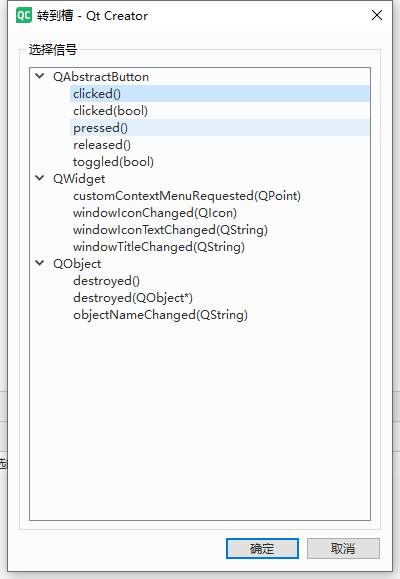
第十三步,回到wiget.ui文件里,依次单击每个buton按钮,选择“转到槽”,然后在弹出窗口中选择“clicked()”,点击确定就会自动转到对应的槽函数,完成绑定
第十四步。构建、运行,效果如下:
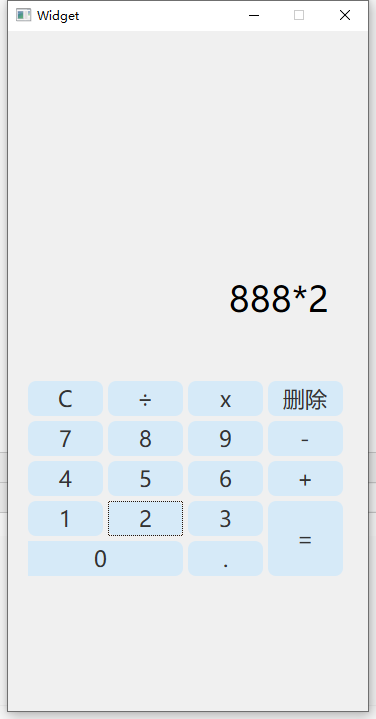
怎么样,测测吧!
最后,如果编译时提示头文件没有包含,可以修改txt文件,参考如下:
cmake_minimum_required(VERSION 3.16)


project(WidgetTest VERSION 0.1 LANGUAGES CXX)

set(CMAKE_AUTOUIC ON)
set(CMAKE_AUTOMOC ON)
set(CMAKE_AUTORCC ON)

set(CMAKE_CXX_STANDARD 17)
set(CMAKE_CXX_STANDARD_REQUIRED ON)

find_package(QT NAMES Qt6 Qt5 REQUIRED COMPONENTS Widgets)
find_package(Qt${QT_VERSION_MAJOR} REQUIRED COMPONENTS Widgets)
find_package(Qt6 REQUIRED COMPONENTS Qml)   #新增

set(PROJECT_SOURCES
        main.cpp
        widget.cpp
        widget.h
        widget.ui
)

if(${QT_VERSION_MAJOR} GREATER_EQUAL 6)
    qt_add_executable(WidgetTest
        MANUAL_FINALIZATION
        ${PROJECT_SOURCES}
    )
# Define target properties for Android with Qt 6 as:
#    set_property(TARGET WidgetTest APPEND PROPERTY QT_ANDROID_PACKAGE_SOURCE_DIR
#                 ${CMAKE_CURRENT_SOURCE_DIR}/android)
# For more information, see https://doc.qt.io/qt-6/qt-add-executable.html#target-creation
else()
    if(ANDROID)
        add_library(WidgetTest SHARED
            ${PROJECT_SOURCES}
        )
# Define properties for Android with Qt 5 after find_package() calls as:
#    set(ANDROID_PACKAGE_SOURCE_DIR "${CMAKE_CURRENT_SOURCE_DIR}/android")
    else()
        add_executable(WidgetTest
            ${PROJECT_SOURCES}
        )
    endif()
endif()

target_link_libraries(WidgetTest PRIVATE Qt${QT_VERSION_MAJOR}::Widgets)
target_link_libraries(WidgetTest PRIVATE Qt6::Qml)  #新增为了支持JS
# Qt for iOS sets MACOSX_BUNDLE_GUI_IDENTIFIER automatically since Qt 6.1.
# If you are developing for iOS or macOS you should consider setting an
# explicit, fixed bundle identifier manually though.
if(${QT_VERSION} VERSION_LESS 6.1.0)
  set(BUNDLE_ID_OPTION MACOSX_BUNDLE_GUI_IDENTIFIER com.example.WidgetTest)
endif()
set_target_properties(WidgetTest PROPERTIES
    ${BUNDLE_ID_OPTION}
    MACOSX_BUNDLE_BUNDLE_VERSION ${PROJECT_VERSION}
    MACOSX_BUNDLE_SHORT_VERSION_STRING ${PROJECT_VERSION_MAJOR}.${PROJECT_VERSION_MINOR}
    MACOSX_BUNDLE TRUE
    WIN32_EXECUTABLE TRUE
)

include(GNUInstallDirs)
install(TARGETS WidgetTest
    BUNDLE DESTINATION .
    LIBRARY DESTINATION ${CMAKE_INSTALL_LIBDIR}
    RUNTIME DESTINATION ${CMAKE_INSTALL_BINDIR}
)

if(QT_VERSION_MAJOR EQUAL 6)
    qt_finalize_executable(WidgetTest)
endif()C语言网提供由在职研发工程师或ACM蓝桥杯竞赛优秀选手录制的视频教程,并配有习题和答疑,点击了解:
一点编程也不会写的:零基础C语言学练课程
解决困扰你多年的C语言疑难杂症特性的C语言进阶课程
从零到写出一个爬虫的Python编程课程
只会语法写不出代码?手把手带你写100个编程真题的编程百练课程
信息学奥赛或C++选手的 必学C++课程
蓝桥杯ACM、信息学奥赛的必学课程:算法竞赛课入门课程
手把手讲解近五年真题的蓝桥杯辅导课程